Stop using APEX_ITEM.CHECKBOX2

Introduction
This is a quick tip if you are still using the APEX_ITEM.CHECKBOX2 function embedded in your reports' SQL.
SELECT APEX_ITEM.CHECKBOX2(P_IDX => 10, P_VALUE => ID) AS CHKBOX,
......
FROM   MYTABLE
You might want to stop using this API for two reasons:
APEX_ITEM API is now declared as "legacy" so, while not deprecated and still fully supported, it will not be getting any future updates. The APEX team are hoping Interactive Grids will encourage developers to replace all use of this API.
Function calls that execute for every row returned by a query are generally a bad idea and, as a best practice, should be avoided as much as possible.
Leveraging the HTML Expression field.
Let's imagine I have a table called MYTABLE that has a unique key column named ID which I was passing as the P_VALUE parameter to APEX_ITEM.CHECKBOX2 in an interactive report query. This would then allow my users to selectively tick a checkbox on each row to be passed on to some downstream functionality.
To reproduce this without using the APEX_ITEM function I must first, remove the function from my SQL query and replace it with a placeholder:
SELECT NULL AS CHKBOX,
ID,
......
FROM   MYTABLE
This NULL placeholder means I still retain the report column "CHKBOX" that will continue to display my checkbox, I just have to ensure that we also expose the ID column that was my P_VALUE parameter if it isn't already.
In the attributes for the CHKBOX column, scrolling down to the Column Formatting section, I put the following in the HTML Expression:
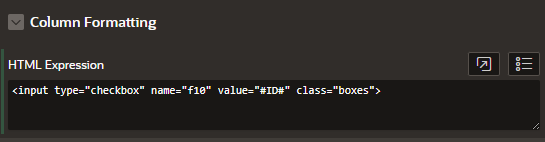
<input type="checkbox" name="f10" value="#ID#" class="boxes">
Remember to change the name attribute to match the APEX_APPLICATION.G_Fnn item you want to use (within the range of 01 to 50) and the #ID# substitution string to match your unique key column name.
Reproducing the P_CHECKED_VALUES Functionality
One of the nice features of the APEX_ITEM function was the ability to pass in a delimited list of identifiers to render pre-checked checkboxes. How can we recreate this? In a previous blog I showcased the power and simplicity of template directives and this is where they come to the fore.
First I have to add a new column to the SQL query that I can use to determine if that row's checkbox should be checked when rendered. Hopefully this won't be a new PL/SQL function call and can be a simple inline test.
SELECT NULL AS CHKBOX,
ID,
CASE WHEN <<logic to test if it should be checked goes here>> THEN 1 ELSE 0 END AS CHECKIT
......
FROM   MYTABLE
Now I can use this computed column in a template directive as follows:
<input type="checkbox" name="f10" value="#ID#" class="boxes" {case CHECKIT/}
 {when 1/}
    checked="checked"
 {otherwise/}

{endcase/}>
Conclusion
I have eliminated a dependency on a "legacy" APEX_ITEM function call that executes for every row and pushed the burden on to the client to do the heavy lifting. Follow the same approach and your database and DBA will thank you for it.
About the author
I am a Certified Senior Oracle Developer/Data Architect with a passion for all things data and an advocate for the Oracle APEX low code platform that I have seen mature to become a fully-fledged enterprise level solution. I have several decades of experience in multiple industries such as Finance, Energy and the Public Sector and hope that I can impart some of that experience in my blog posts.